
GoHighLevel
Visit gohighlevel.com
GoHighLevel review: one system for leads, follow-up and client accounts
GoHighLevel makes the most sense when several parts of your sales process need to work together. A lead arrives through a form, receives a follow-up, books an appointment and moves through a pipeline. The attraction is keeping that process in one place, especially when an agency repeats it across clients.
Our verdict: shortlist it for agencies and service businesses with a defined follow-up process. If all you need is one booking page or a simple mailing list, first weigh the setup effort against that narrower requirement.
Affiliate disclosure: BestAIRank may earn a commission if you subscribe through our links. This assessment uses official product information and documentation. We have not operated a client account or tested live campaigns on HighLevel.
What the platform brings together
HighLevel combines CRM pipelines, forms, websites and funnels, calendars, conversations and workflow automation. Its public product pages also describe Voice AI and Conversation AI alongside lead-capture and follow-up tools.
A sub-account is the workspace for a business or client. That is the unit to count when comparing plans—not simply how many people will log in. An agency managing different client operations needs to think about account separation, permissions and who maintains each workflow.
A realistic example: follow up on a service inquiry
Imagine a small agency working with a home-services company. A visitor submits an inquiry form. The proposed workflow creates a contact, places the inquiry in a pipeline and gives the team a next action. A booking calendar can handle appointment availability; a follow-up sequence can remind someone who has not booked.
Build that one route before importing every contact or replacing every tool. Check duplicate contacts, replies that should stop a sequence, appointment changes and how a staff member takes over. These are suggested acceptance checks, not failures we encountered in a trial.
Pricing: three main platform plans
Official USD prices checked on October 13, 2026. Annual prices are total yearly charges. Usage and optional services can add to these subscription amounts.
All three list unlimited contacts and users. Enterprise pricing is available through sales. The standard offer advertises a 14-day trial; billing starts automatically unless canceled, and usage fees can apply during the trial.

What the base price does not tell you
Phone numbers, calls, messages, e-mail delivery and some AI activity have usage-based costs. “Unlimited” sub-accounts does not mean unlimited free communication. Estimate the traffic for each client rather than treating the subscription as your complete operating budget.
AI Employee currently offers pay-per-use, Growth at $50/month per enabled sub-account, and Unlimited at $97/month per enabled sub-account. Growth lists 1,000 Conversation AI responses and 100 Voice AI minutes monthly. Unlimited covers those AI products subject to fair use; separate Phone System charges remain. Agent Studio is pay-per-use across the AI plans.
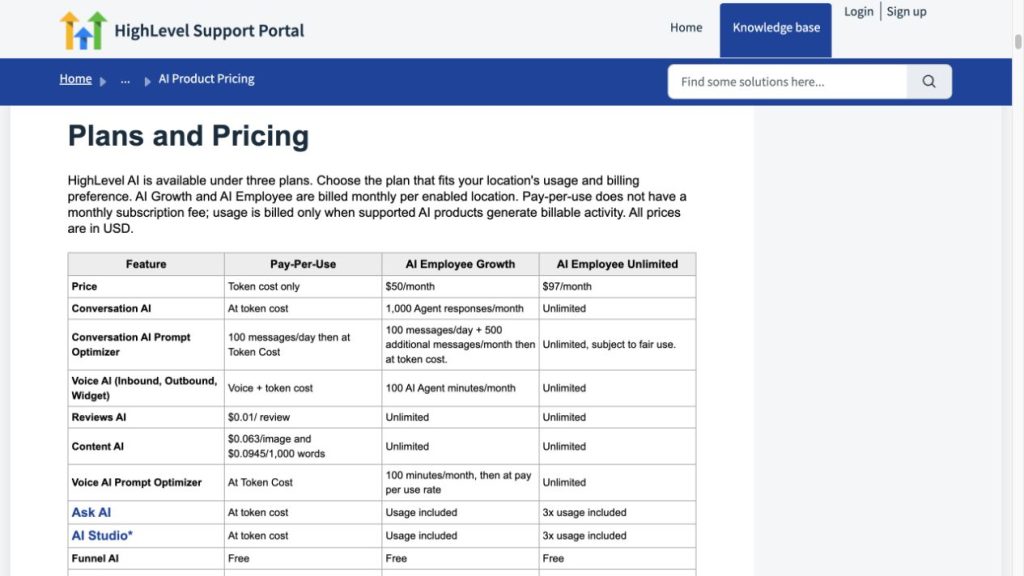
Budget example: a $97 Starter subscription plus AI Employee Growth for one enabled sub-account starts at $147/month before taxes, communications and any other billable services. Enabling Growth for all three sub-accounts would bring those two subscription components to $247/month. These are arithmetic examples, not a quote for your account.
Starter, Unlimited or Agency Pro?
Start by counting active businesses. Starter is the first plan to examine if three workspaces are enough. Unlimited becomes relevant when the account limit is the obstacle. Agency Pro deserves a closer look if you have a concrete plan to sell access to your own software offering and need SaaS Mode—not just because it is the largest standard tier.
Our suggested trial goal is one working lead-to-booking process, with an understood monthly cost. That is a more useful decision point than the number of features you can enable.
Pros and cons
FAQ
Before subscribing: map one client journey, count the required sub-accounts and estimate communication and AI usage separately.
Sources: HighLevel’s official product and pricing pages; its Help Center guides to AI Product Pricing and AI Employee billing. Screenshots show public product material, not a live client deployment by BestAIRank.