
Quso AI
Quso.ai Review: Your All-in-One AI Marketing Powerhouse
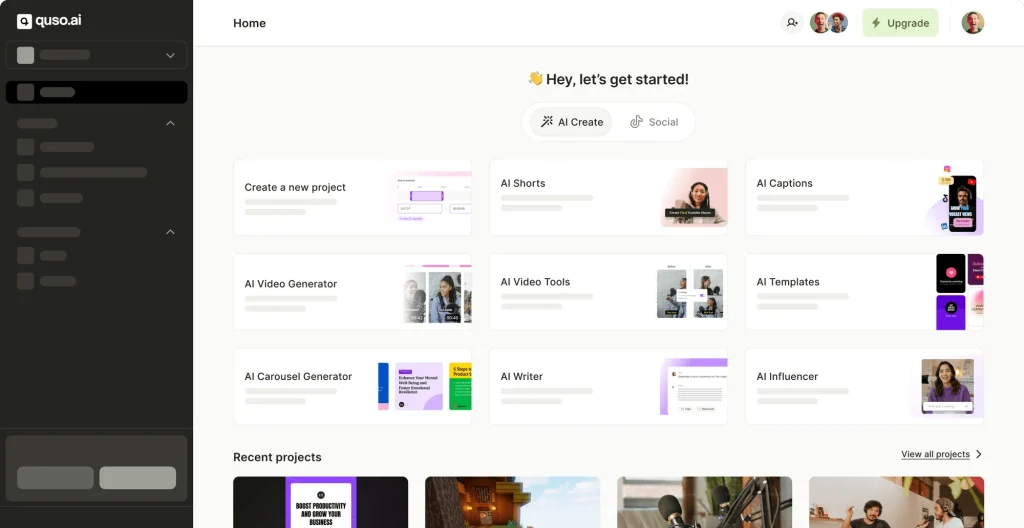
If you’re looking to supercharge your social media presence without juggling multiple tools, Quso.ai might be the game-changer you need. From AI-driven content creation to a full-fledged video editor, this platform aims to replace everything from typical scheduling apps to advanced clipping services. Below, you’ll find an overview of Quso’s core functionalities and why it might be worth your consideration.
Quick Highlights
- Comprehensive AI Toolkit
- AI Content Creator: Generate ideas, social posts, carousels, and videos—all with just a prompt.
- AI Clips Generator: Repurpose lengthy recordings into engaging short videos.
- AI Video Editor: Add subtitles, remove filler words, and integrate stock B-roll clips in a flash.
- Social Media Manager: Plan, schedule, and track content across major platforms, complete with analytics and AI-assisted captions.
- Diverse Use Cases
- Creators & YouTubers: Turn long-form videos into bite-sized, scroll-stopping clips.
- Social Media Teams: Curate, schedule, and post from a single dashboard—no more hopping between apps.
- Entrepreneurs & Small Businesses: Access a virtual marketing department that cuts overhead costs and time-to-market.
- Agencies & Enterprises: Scale client content production and brand management, thanks to integrated workflows and multi-language support.
- Impressive Metrics
- 4 Million+ Users: Creator testimonies cite massive subscriber growth, time savings, and cost reductions.
- Notable Stats: Up to 200% faster video creation, 7x more output, and consistent boosts in view counts—from small channels to established brands.
Key Functionalities in Detail
- AI Content Creator
- Posts & Carousels: Transform a simple prompt or idea into fully fleshed-out social posts.
- Video Generator: Kickstart your video content with an AI-driven workflow—no extensive editing expertise needed.
- Repurposing & Influencer Tools: Produce multiple forms of content from a single source, then tap into influencer discovery (branded as “AI Influencer”) to amplify reach.
- AI Social Media Manager
- Centralized Scheduling: Plan upcoming posts across Facebook, Instagram, LinkedIn, TikTok, YouTube, and more—right from a unified calendar.
- Analytics & Trend Analysis: Gain insights into post performance, viewer engagement, and emerging social trends, all powered by AI.
- Caption Assistant: Generate brand-specific captions, complete with relevant hashtags, keywords, and calls to action.
- AI Video Editor
- Subtitle Generator: Caption your clips with styles reminiscent of big-name creators—perfect for silent-auto-play feeds.
- Cutmagic & Filler Word Removal: Remove “umms” and “uhhs” automatically, trimming hours off manual editing.
- B-Roll Library & Custom Clips: Insert stock footage, or specify exact timestamps to create polished highlight reels.
- One-Stop Shop Philosophy
- Quso.ai aims to replace multiple subscriptions—like Hootsuite, Descript, Veed.io, and Repurpose.io—potentially saving up to hundreds in monthly costs.
- The platform’s mission is to centralize your marketing processes, allowing you to ideate, edit, schedule, and analyze content from a single, intuitive hub.
Pros & Cons
Pros
- Integrated Approach: Manage the entire content lifecycle—from concept to distribution—using just one dashboard.
- AI-First Features: Rapid editing, automated scheduling, and insight-driven analytics free you up for more strategic tasks.
- Broad Language & Format Support: Currently accommodates English, Spanish, German, and French, with plans to expand.
- Generous Free Access: Quso lets you try video creation and editing without an immediate subscription.
Cons
- In-Development Tools: Some features, like the AI Ad Maker and AI Trend Analyzer, are still listed as “Coming Soon.”
- Learning Curve: While user-friendly overall, the sheer breadth of AI options can be initially overwhelming.
- Reliance on Connectivity: Because it’s a web-based suite, slow or unstable internet could hamper your workflow.
- Brand-New Ecosystem: Merged from “vidyo.ai,” Quso is still evolving; expect iterative changes and improvements.
Notable Success Stories
- John Price, Pediatric Experience: Credits Quso for “200% faster video creation” by automating clip selection.
- Wendy Richmond, Results Matter Dental Marketing: Claimed a “2,000x increase in views” after switching to Quso for short-form content.
- Seth Green, Online Fitness Coach: Observed a “7x productivity boost,” attributing it to Quso’s streamlined editing and posting setup.
Pricing & Availability
- Free Access: Perfect for dipping your toes in the water, with some limits on file sizes or monthly usage.
- Paid Plans: Offer more advanced features—unrestricted uploads, deeper analytics, robust social scheduling, and premium support.
- Cloud-Based: Since Quso.ai is browser-based, no installation is required, but they do accept large file uploads (5GB for free users, 15GB for pro users).
Final Thoughts
In an industry teeming with separate apps for video editing, scheduling, analytics, and AI copywriting, Quso.ai stands out by unifying them into a single platform. If you’re looking to streamline your marketing or content-creation pipeline—and you appreciate the time- and cost-saving benefits of AI—Quso.ai is worth considering. Whether you’re an influencer seeking new ways to repurpose content, a startup aiming to stay consistent across socials, or a larger agency juggling multiple clients, Quso aims to cut complexity and boost results.
Quso.ai is for anyone who wants to optimize their social media efforts, produce polished videos swiftly, and track real impact—all without piecing together a disjointed tech stack. If that sounds like a win for your brand, give Quso’s free tier a spin and see how it reshapes your marketing game.
Stay creative—happy posting!