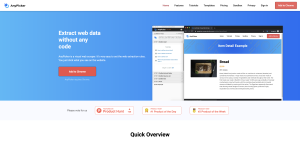
AnyPicker offers a convenient and user-friendly solution for extracting website data without the need for any coding knowledge. This visual web scraper simplifies the process of setting web extraction rules by allowing users to simply click on the elements they want to scrape from a website. With the option to add AnyPicker as a Chrome extension, users can easily integrate this tool into their browsing experience.
Features
AnyPicker boasts a range of features that make web scraping efficient and secure:
- Visual Extraction Rules: Setting extract rules is easier than ever with AnyPicker. Users can click on website elements to define what data they want to scrape, eliminating the need for third-party software.
- Complete Data Privacy: All data processing occurs on the user’s local computer, ensuring that sensitive information remains secure.
- Integration with Google Sheets: Users can save scraped data directly to Google Sheets with a single click, streamlining data management.
- No Usage Limitation: AnyPicker does not restrict the number of pages or sites that can be scraped, allowing for flexibility in data extraction.
- Real-time Preview: Users can view scraping results in real-time while the process is ongoing, enhancing efficiency.
Benefits
By using AnyPicker, users can bypass ‘anti-scraping’ technology and scrape multiple pages simultaneously. The tool’s ability to export data as CSV files further simplifies data analysis and storage. Additionally, AnyPicker allows users to protect their username and password when scraping password-protected websites, enhancing security.
Overall, AnyPicker offers a comprehensive and user-friendly solution for web scraping, catering to both beginners and experienced users alike. With its intuitive interface and robust features, AnyPicker streamlines the data extraction process and ensures data privacy and security.